
Vercel/Cloudflare Pagesを活用したエッジコンピューティング - 高速・低遅延なWebアプリの実現
はじめに
この記事の要点
Q: エッジコンピューティングとは何ですか?
Q: Vercelの強みは?
Q: Cloudflare Pagesの強みは?
Q: エッジに配置すべき処理は?
Webアプリケーションのパフォーマンスは、ユーザー体験を左右する重要な要素です。特にグローバル展開するサービスでは、地理的に離れたユーザーへの応答速度が課題となります。エッジコンピューティングは、コンピューティングリソースをユーザーに近い場所に配置することで、この課題を解決する技術です。
この記事では、VercelとCloudflare Pagesを活用したエッジコンピューティングの実装方法を、実務で使える実践的な手法とともに解説します。
エッジコンピューティングとはどのような技術ですか?
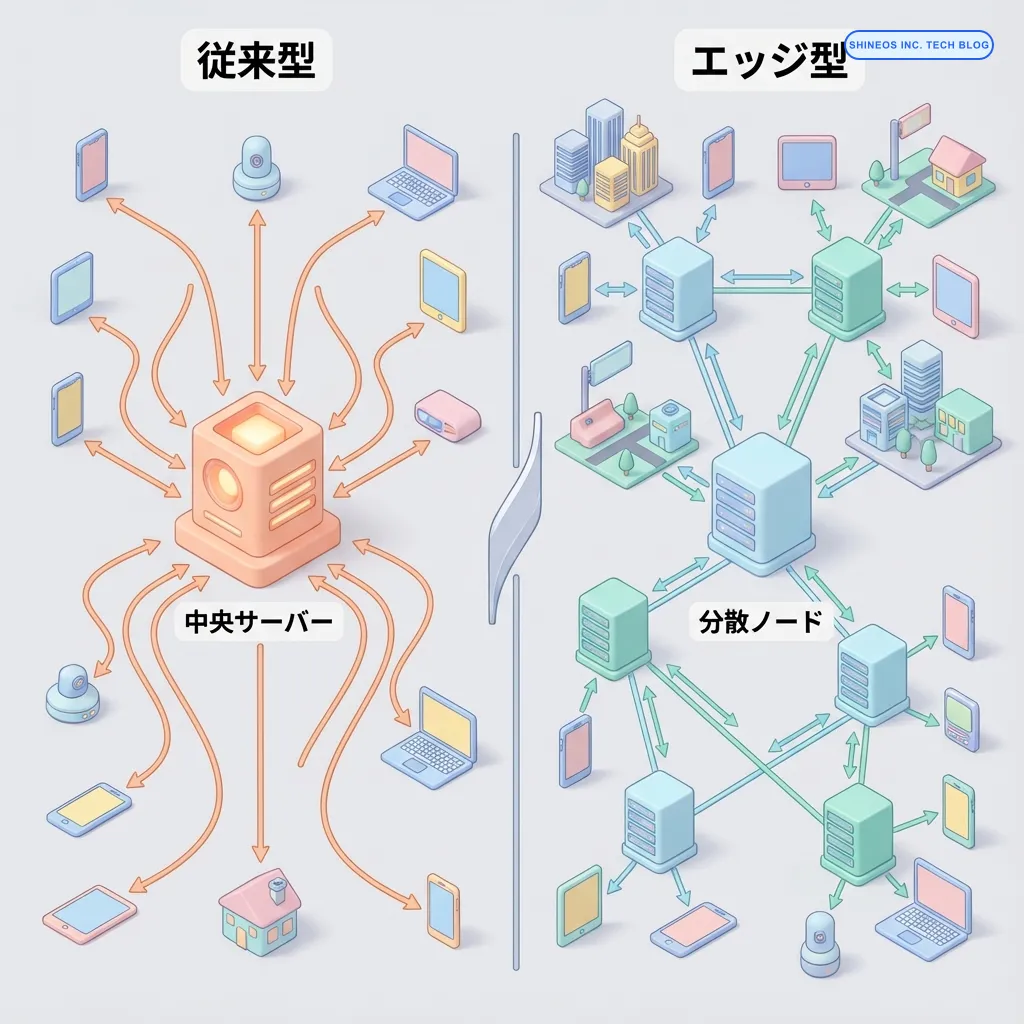
エッジコンピューティングとは、データ処理をクラウドのデータセンター(中央)ではなく、ユーザーに近い「エッジ」のロケーションで実行する技術です。従来のCDN(Content Delivery Network)がキャッシュされた静的コンテンツを配信するのに対し、エッジコンピューティングでは動的な処理も実行できます。
エッジコンピューティングの主な特徴
| 特徴 | 説明 | メリット |
|---|---|---|
| 低レイテンシ | ユーザーに物理的に近い場所で処理 | 応答時間の大幅な短縮 |
| グローバル分散 | 世界中のエッジロケーションで実行 | 地域による性能差の最小化 |
| 動的処理 | APIリクエストや認証処理をエッジで実行 | バックエンドの負荷軽減 |
| 自動スケーリング | トラフィックに応じて自動拡張 | インフラ管理の簡素化 |
まとめ
本記事で解説したエッジコンピューティングの重要なポイントは以下の通りです:
エッジコンピューティングの活用場面
- 静的サイト生成(SSG)とエッジでの動的処理の組み合わせ
- パーソナライゼーション、A/Bテスト、認証処理のエッジ実装
- CDNとEdge Functionsの連携による最適化
Vercel vs Cloudflare Pages
- Vercel:Next.jsとの統合が強力、開発体験に優れる
- Cloudflare Pages:グローバルネットワークが広大、Workers連携が柔軟
パフォーマンス最適化のポイント
- Edge Functionsの実行時間を最小化(Cold Start対策)
- 適切なキャッシング戦略の実装
- 地域ごとのパフォーマンス監視
VercelとCloudflare Pagesにはどのような違いがありますか?
VercelとCloudflare Pagesは、どちらもエッジコンピューティングに対応したホスティングプラットフォームですが、特徴が異なります。
比較表
| 項目 | Vercel | Cloudflare Pages |
|---|---|---|
| Edge Network | グローバル 110+ ロケーション | 世界 275+ 都市以上 |
| Edge Functions | Vercel Edge Functions(V8) | Cloudflare Workers(V8) |
| フレームワーク対応 | Next.js、SvelteKit等 | 多数のフレームワークに対応 |
| Cold Start | 比較的速い | 非常に速い(0ms Cold Start) |
| 実行時間制限 | 30秒(Hobby)、25秒(Edge) | 50ms(無料)、無制限(有料) |
| 料金 | $20/月〜(Pro) | $5/月〜(有料プラン) |
| 開発体験 | 優れたDX、Next.js統合 | Workers連携、KVストレージ |
選択のガイドライン
- Next.jsプロジェクト: Vercelの統合が強力でおすすめ
- グローバル展開重視: Cloudflareのネットワークが広範囲
- 柔軟なWorkers活用: Cloudflare PagesとWorkersの連携が強力
- コスト重視: Cloudflareの無料枠が充実
実際には、プロジェクトの特性やチームの経験に応じて選択します。
Vercel Edge Functionsの実装
VercelのEdge Functionsは、Vercelのグローバルエッジネットワークで実行されるサーバーレス関数です。
基本的な実装例
// pages/api/edge-hello.ts
import { NextRequest, NextResponse } from 'next/server';

export const config = {
  runtime: 'edge',
};

export default async function handler(req: NextRequest) {
  const { searchParams } = new URL(req.url);
  const name = searchParams.get('name') || 'World';

  return NextResponse.json({
    message: `Hello, ${name}!`,
    timestamp: new Date().toISOString(),
    location: req.geo?.city || 'Unknown',
  });
}
パーソナライゼーションの実装
エッジで位置情報を取得し、ユーザーに最適化されたコンテンツを提供します。
// middleware.ts
import { NextRequest, NextResponse } from 'next/server';

export function middleware(request: NextRequest) {
  const { geo } = request;
  const country = geo?.country || 'US';
  const city = geo?.city || 'Unknown';

  // 位置情報に基づいてレスポンスをカスタマイズ
  const response = NextResponse.next();

  // カスタムヘッダーを追加
  response.headers.set('x-user-country', country);
  response.headers.set('x-user-city', city);

  // 地域別のリダイレクト(日本からのアクセスを日本語ページへ)
  if (country === 'JP' && !request.nextUrl.pathname.startsWith('/ja')) {
    return NextResponse.redirect(new URL(`/ja${request.nextUrl.pathname}`, request.url));
  }

  return response;
}

export const config = {
  matcher: [
    '/((?!api|_next/static|_next/image|favicon.ico).*)',
  ],
};
A/Bテストの実装
エッジでA/Bテストを実装し、ユーザーごとに異なるバージョンを配信します。
// middleware.ts
import { NextRequest, NextResponse } from 'next/server';

const COOKIE_NAME = 'ab-test-variant';
const VARIANTS = ['control', 'variant-a', 'variant-b'];

export function middleware(request: NextRequest) {
  // 既存のバリアントをクッキーから取得
  let variant = request.cookies.get(COOKIE_NAME)?.value;

  // バリアントが未設定の場合はランダムに割り当て
  if (!variant || !VARIANTS.includes(variant)) {
    variant = VARIANTS[Math.floor(Math.random() * VARIANTS.length)];
  }

  // バリアントに応じてリライト
  const url = request.nextUrl.clone();

  if (variant !== 'control' && url.pathname === '/') {
    url.pathname = `/ab-test/${variant}`;
  }

  const response = NextResponse.rewrite(url);

  // クッキーにバリアントを保存(7日間)
  response.cookies.set(COOKIE_NAME, variant, {
    maxAge: 60 * 60 * 24 * 7,
    path: '/',
  });

  return response;
}
Cloudflare Pages + Workersの実装
Cloudflare PagesはCloudflare Workersと統合されており、強力なエッジ機能を提供します。
Cloudflare Pages Functionsの基本
// functions/api/hello.ts
export async function onRequest(context) {
  const { request, env } = context;
  const url = new URL(request.url);
  const name = url.searchParams.get('name') || 'World';

  return new Response(
    JSON.stringify({
      message: `Hello, ${name}!`,
      timestamp: new Date().toISOString(),
      country: request.cf?.country || 'Unknown',
      colo: request.cf?.colo || 'Unknown', // Cloudflareデータセンターのコード
    }),
    {
      headers: {
        'content-type': 'application/json',
      },
    }
  );
}
KV(Key-Value)ストレージの活用
Cloudflare Workers KVを使用して、エッジでデータを保存・取得します。
// functions/api/counter.ts
export async function onRequestGet(context) {
  const { env } = context;

  // KVから現在のカウントを取得
  const count = await env.COUNTER_KV.get('page_views') || '0';

  return new Response(
    JSON.stringify({ views: parseInt(count) }),
    {
      headers: { 'content-type': 'application/json' },
    }
  );
}

export async function onRequestPost(context) {
  const { env } = context;

  // カウントをインクリメント
  const count = await env.COUNTER_KV.get('page_views') || '0';
  const newCount = parseInt(count) + 1;

  await env.COUNTER_KV.put('page_views', newCount.toString());

  return new Response(
    JSON.stringify({ views: newCount }),
    {
      headers: { 'content-type': 'application/json' },
    }
  );
}
エッジでの認証処理
// functions/_middleware.ts
import { verifyJWT } from './utils/jwt';

export async function onRequest(context) {
  const { request, next } = context;
  const url = new URL(request.url);

  // 認証が不要なパス
  const publicPaths = ['/login', '/signup', '/api/public'];
  if (publicPaths.some(path => url.pathname.startsWith(path))) {
    return next();
  }

  // JWTトークンの検証
  const authHeader = request.headers.get('Authorization');
  const token = authHeader?.replace('Bearer ', '');

  if (!token) {
    return new Response('Unauthorized', { status: 401 });
  }

  try {
    const payload = await verifyJWT(token, context.env.JWT_SECRET);

    // ユーザー情報をヘッダーに追加
    const response = await next();
    response.headers.set('x-user-id', payload.sub);

    return response;
  } catch (error) {
    return new Response('Invalid token', { status: 401 });
  }
}
パフォーマンス最適化のテクニック
エッジコンピューティングの効果を最大化するための最適化手法を紹介します。
キャッシング戦略
// Vercel Edge Functionsでのキャッシング
import { NextRequest, NextResponse } from 'next/server';

export const config = {
  runtime: 'edge',
};

export default async function handler(req: NextRequest) {
  const { searchParams } = new URL(req.url);
  const productId = searchParams.get('id');

  // APIからデータを取得
  const product = await fetchProductFromAPI(productId);

  const response = NextResponse.json(product);

  // キャッシュヘッダーを設定(1時間キャッシュ、バックグラウンドで再検証)
  response.headers.set(
    'Cache-Control',
    's-maxage=3600, stale-while-revalidate=86400'
  );

  return response;
}

async function fetchProductFromAPI(id: string) {
  const res = await fetch(`https://api.example.com/products/${id}`, {
    // Fetch APIのキャッシュオプション
    next: { revalidate: 3600 }, // Next.js 13+の場合
  });

  return res.json();
}
ストリーミングレスポンス
大きなレスポンスをストリーミングで送信し、初回バイトまでの時間(TTFB)を改善します。
// Cloudflare Workersでのストリーミング
export async function onRequest(context) {
  const { readable, writable } = new TransformStream();
  const writer = writable.getWriter();
  const encoder = new TextEncoder();

  // バックグラウンドでデータを送信
  (async () => {
    try {
      // 最初のチャンクをすぐに送信
      await writer.write(encoder.encode('{"status":"processing","items":['));

      // データを段階的に取得して送信
      for (let i = 0; i < 10; i++) {
        const item = await fetchItem(i);
        const prefix = i > 0 ? ',' : '';
        await writer.write(encoder.encode(`${prefix}${JSON.stringify(item)}`));

        // 少し待機(リアルなストリーミングをシミュレート)
        await new Promise(resolve => setTimeout(resolve, 100));
      }

      await writer.write(encoder.encode(']}'));
    } catch (error) {
      console.error('Streaming error:', error);
    } finally {
      await writer.close();
    }
  })();

  return new Response(readable, {
    headers: {
      'content-type': 'application/json',
      'transfer-encoding': 'chunked',
    },
  });
}
リージョン別のフォールバック
特定のリージョンでエラーが発生した場合のフォールバック処理を実装します。
// Vercel Edge Functionsでのフォールバック
export default async function handler(req: NextRequest) {
  const { geo } = req;
  const region = geo?.region || 'default';

  // リージョン別のAPIエンドポイント
  const endpoints = {
    'us-east': 'https://api-us-east.example.com',
    'eu-west': 'https://api-eu-west.example.com',
    'ap-northeast': 'https://api-ap-northeast.example.com',
    'default': 'https://api.example.com',
  };

  const primaryEndpoint = endpoints[region] || endpoints.default;
  const fallbackEndpoint = endpoints.default;

  try {
    // 最初にリージョンのAPIを試行
    const response = await fetch(primaryEndpoint, {
      signal: AbortSignal.timeout(5000), // 5秒でタイムアウト
    });

    if (response.ok) {
      return NextResponse.json(await response.json());
    }

    throw new Error('Primary endpoint failed');
  } catch (error) {
    // フォールバックAPIを使用
    console.warn(`Falling back from ${primaryEndpoint} to ${fallbackEndpoint}`);

    const response = await fetch(fallbackEndpoint);
    return NextResponse.json(await response.json());
  }
}
エッジ関数の制限事項
- 実行時間制限: Vercel(25秒)、Cloudflare(50ms〜無制限)
- メモリ制限: 一般的に128MB以下
- API制限: 一部のNode.js APIが利用不可
- Cold Start: 初回実行時の遅延(特にVercel)
- デバッグの難しさ: ローカル環境との差異
これらの制限を理解した上で、適切な処理をエッジに配置することが重要です。
実装例:Next.js + Vercelでのエッジ最適化
完全な実装例を見てみましょう。
// app/page.tsx (Server Component)
import { headers } from 'next/headers';

export default async function Home() {
  const headersList = headers();
  const country = headersList.get('x-user-country') || 'Unknown';
  const city = headersList.get('x-user-city') || 'Unknown';

  return (
    <div>
      <h1>Welcome from {city}, {country}!</h1>
      <ProductList />
    </div>
  );
}

// app/components/ProductList.tsx (Server Component with caching)
async function getProducts() {
  const res = await fetch('https://api.example.com/products', {
    next: { revalidate: 3600 }, // 1時間キャッシュ
  });

  return res.json();
}

export default async function ProductList() {
  const products = await getProducts();

  return (
    <div>
      {products.map(product => (
        <ProductCard key={product.id} product={product} />
      ))}
    </div>
  );
}

// middleware.ts (Edge Runtime)
import { NextResponse } from 'next/server';
import type { NextRequest } from 'next/server';

export function middleware(request: NextRequest) {
  const { geo } = request;

  const response = NextResponse.next();

  // 位置情報をヘッダーに追加
  response.headers.set('x-user-country', geo?.country || 'Unknown');
  response.headers.set('x-user-city', geo?.city || 'Unknown');

  return response;
}
よくある質問
エッジ関数とサーバーレス関数の使い分けはどうすべきか?
エッジ関数は低遅延が求められる処理(認証、パーソナライゼーション、A/Bテスト、リダイレクト)に適しています。一方、重い計算処理、データベースへの複雑なクエリ、長時間実行する処理はサーバーレス関数またはバックエンドサーバーで実行すべきです。一般的な目安として、100ms以内で完了する処理はエッジ関数、それ以上かかる処理は通常のサーバーレス関数が適しています。
Cloudflare WorkersのKVストレージはどのような用途に適しているか?
KVストレージは、読み取りが多く書き込みが少ないデータ(設定情報、ユーザープロファイル、A/Bテストのバリアント、キャッシュ)に最適です。結果整合性モデルのため、厳密なトランザクションが必要な処理(金融取引、在庫管理)には向いていません。また、グローバルに複製されるため、読み取り性能は非常に高速ですが、書き込みは反映に時間がかかる場合があります。
VercelとCloudflare Pagesを併用することは可能か?
技術的には可能ですが、一般的には推奨されません。両プラットフォームは似た機能を提供しており、管理の複雑さが増すためです。ただし、特定のサービス(例:メインサイトをVercelでホスト、特定のマイクロサービスをCloudflare Workersで実装)を分けて運用する戦略は有効な場合があります。重要なのは、チームのスキルセットと各サービスの強みを活かした設計です。
おわりに
エッジコンピューティングは、グローバルなWebアプリケーションのパフォーマンスを大幅に改善する技術です。VercelとCloudflare Pagesは、それぞれ異なる強みを持ち、プロジェクトの特性に応じて選択できます。
本記事で紹介した実装パターンと最適化手法を活用することで、ユーザーに高速で快適な体験を提供できます。エッジ関数の制限事項を理解し、適切な処理をエッジに配置することが成功の鍵です。
私たちShineosでは、最新のエッジコンピューティング技術を活用したWebアプリケーション開発をサポートしています。パフォーマンス最適化でお困りの際は、ぜひご相談ください。